

















































Tiger Simulator 3D Guide: Controls, Family, Upgrades and Survival
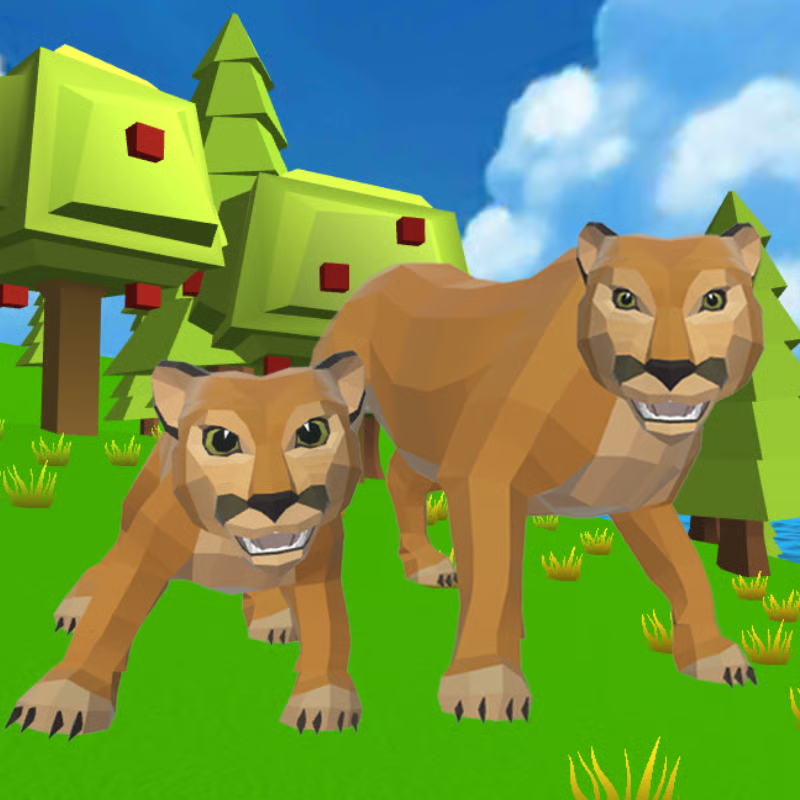
Tiger Simulator 3D by CyberGoldFinch puts you in the paws of a wild tiger in a large open forest. You hunt for food, complete quests, find a tiger soulmate, raise cubs, and upgrade your family to take on tougher animals and boss enemies.
This guide covers the questions players ask most: how to play on keyboard and mobile, what quests to do first, how to hunt without starving, how to survive boss fights, how to level up and choose upgrades, how to get a mate and cubs, and how to play unblocked on Chromebook or mobile with your save kept.
How to control your tiger on browser and mobile
On desktop browser, the core controls are commonly listed as move with WASD or arrow keys, look with the mouse, attack with left mouse button, jump with Space, run by holding Shift, and interact with E. Some versions also list right-click for special ability, R to roar, and Esc or P to pause, but those extra keys can vary, so check the help icon in your version.
On mobile and tablet, use the virtual joystick to move and the on-screen buttons to attack, jump, and sprint. Move with one thumb, drag to aim the camera, then tap attack when close. If turning feels slow, raise camera sensitivity, and on older devices lower graphics quality for smoother play.
Quick start tip: walk or stalk into range first, then hold Shift only for the final chase. Sprint drains stamina, so save it for catching prey or escaping danger.
What to do in quests and where to explore first
Quests are the fastest way to learn the map and earn points for upgrades. Guides consistently describe three quest types: hunt specific animals, find ancient artifacts and relics, and launch fireworks for fun rewards.
For your first sessions, take quests near your starting area and den instead of wandering far. Quest runs teach prey locations, safe routes, and boss zones while giving better rewards than random hunting.
The world mixes forest, grassland and savanna, riverbanks, and scattered villages and dens. Stay near water and cover early: prey gathers there, tall grass and rocks break line of sight, and a nearby den gives you a place to retreat, heal, and manage family members.
How to hunt without starving
You need meat to feed yourself and later your family, so keep food coming in before health drops.
- Start small: begin with rabbits, deer, and other smaller, less dangerous prey to practice timing.
- Use cover: approach from tall grass or behind rocks, then sprint and pounce when close.
- Time your hits: circle larger animals, hit and back off, and save stamina for a finishing burst.
- Keep reserves: collect extra food instead of living meal to meal, so failed hunts do not cause starvation.
- Watch health and hunger: if both are dropping, break off, hunt easy prey, and return toward the den.
Some animals are peaceful and some are very dangerous. If an animal looks much bigger or guards territory, skip it until you are stronger and have family help.
How to survive boss enemies and dangerous animals
Powerful boss animals guard valuable territories. Treat them as progression checks, not first targets.
- Do not rush bosses solo: upgrade attack, energy, and life first, build food reserves, and bring your mate or cubs when you can.
- Pick easy fights first: avoid very dangerous creatures until your family is upgraded to prevent wasted food and deaths.
- Use hit-and-run: dart in, attack, then retreat to recover. Let family members draw attention, then re-engage from the side.
- Save sprint for escape: keep enough stamina to break away and heal at the den if health falls low.
- Prepare before the fight: eat first, have food stored, and fight near cover so you can reset.
Boss names and locations can differ between browser and app versions, so use this rule: if you need many hits while it can down you in one or two, leave, level up, and return with family support.
How to level up fast and which upgrades to pick first
You earn experience through hunting and completing tasks. Leveling lets you improve attack, energy, and life points for each family member, plus special skills such as faster movement, better food gathering, and more resources from actions. Exact XP amounts and costs are not published consistently, so focus on order and habits.
- Do quests plus small hunts together: chain a quest target with rabbits or deer on the way for steady meat and XP.
- Prioritize speed and attack early: speed helps you catch prey and escape danger, attack shortens fights and saves health.
- Add life and energy next: more life survives boss hits, more energy helps you sprint, chase, and finish fights.
- Take food and resource specials when offered: gather-more-food and bonus-resource skills pay off over many hunts, especially once you feed cubs.
- Upgrade the whole family, not just one tiger: spread points so your mate and cubs can hunt and defend.
To improve a companion, hunt and collect food, then feed children or your mate. Feeding plus upgrades is how cubs grow from followers into real hunting help.
How to find a mate and raise cubs
Building a family is the biggest power jump in the game.
- Find another tiger: explore and look for a friendly tiger, then interact to team up and start a family. Your mate helps in combat and hunting.
- Level up to unlock cubs: after leveling, you can have cubs. The commonly listed limit is up to 4 cubs.
- Feed and upgrade each member: hunt, collect food, then feed cubs and your companion. Upgrade their attack, energy, and life individually.
- Use family in fights: fed and upgraded cubs and mate will hunt and fight alongside you, letting you tackle larger prey and mini-bosses.
- Protect young cubs: keep them away from very dangerous predators until they are stronger, and keep food reserves so growth does not stall.
You can also change appearance with several skins and funny hats for your main tiger, partner, and cubs. Skins and hats are cosmetic; upgrades and feeding are what make the family stronger.
Can you play unblocked on Chromebook or mobile, and how do you keep your save?
In most cases you can play free in a web browser without download. It runs in modern browsers such as Chrome, Edge, Firefox, and Safari on desktop, Chromebook, phones, and tablets.
- Chromebook and school networks: it is often listed as unblocked where game domains are allowed. Availability depends on your school or workplace policy. If the game loads on the page, you are good to go.
- Mobile: modern phones and tablets are supported with touch controls. Use Wi-Fi for first load, since browser play needs an internet connection to load and save.
- Saving: progress is typically saved automatically in the browser local storage. Stay on the same browser and same device to continue later. Clearing site data, using private mode, or switching browsers can remove the save.
If the game lags, close extra tabs, enable hardware acceleration, update your browser, and lower graphics quality. On mobile, short sessions near your den with small hunts and one quest at a time run smoothest.
Quick checklist for a strong start
- Learn move, attack, jump, sprint, and interact keys or touch buttons.
- Do nearby hunt and artifact quests while hunting rabbits and deer.
- Keep food reserves and retreat to the den when low.
- Find a mate early, then level up to unlock up to 4 cubs.
- Upgrade speed and attack first, then life, energy, and food-gathering specials across the whole family.
- Skip bosses and very dangerous creatures until upgraded and fed, then return with family help.
Comments(1)
It was fun..after it stopped malfunctioning
i know right