Doggy Tricks – Play Free Online Dog Training Fun on PC

Aces of the Sky: Epic Dogfights
Dogs vs Aliens
Doggy Tricks
Escape the Dog
HotDog TD

Fun Puzzles

Suez Canal Training Simulator

15 Seconds

Stickman battle 1-4 Players

Digital Circus: Obby
Fleeing The Complex
Find Me: Lost Objects

Fashion Challenge: Catwalk Run
Aim Trainer Idle
Perfect Drive

Bakery Manager: Store Simulator

Obstacle Course Ragdoll
House of Hazards

Scoring Champion

Is Today Another Day?

Hidden Shapes Animals
Doggy Tricks – Play Free Online Dog Training Fun on PC
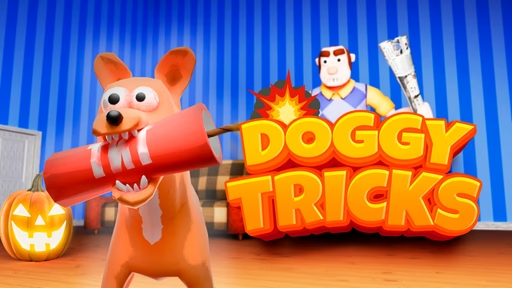
If you love playful puppies, clever puzzles, and quick sessions of pure fun, Doggy Tricks is the kind of browser game that will keep you smiling round after round. This charming online title drops you into a colorful world of wagging tails, bouncing balls, and smart training challenges, all playable directly on your PC with no download required. Whether you’re at home, on a laptop at a café, or sneaking in a quick break between tasks, you can jump in and start teaching your virtual dog new tricks in seconds.
On this page you’ll find everything you need to know before you press the play button: how Doggy Tricks works, what the controls are, how to get higher scores, and why this pet-themed mini game is so addictive for dog lovers, casual players, and puzzle fans alike. Think of it as your complete guide to mastering every spin, roll, fetch, and sit that your digital puppy can learn.
What Is Doggy Tricks?
Doggy Tricks is an online mini game centered around one simple idea: train a virtual dog to perform as many tricks as possible while chasing points, stars, or time bonuses. Instead of managing complex stats or long storylines, the game focuses on short levels and bite-sized challenges that fit perfectly into a browser session on PC.
You’ll typically see a cheerful dog on screen, with a training area filled with platforms, obstacles, toys, and objects that react when you click or move your character. Each level presents a small goal, such as:
-
Getting your dog to jump over a hurdle
-
Making it roll over a certain number of times
-
Guiding it to fetch an item and return
-
Timing a combo of tricks in the right order
As you complete goals, you unlock more stages, new animations, faster challenges, and often cosmetic rewards like different collars, backgrounds, or outfits. The tone stays light and family-friendly, making Doggy Tricks suitable for kids, students, and adults who just want a relaxed browser game that runs smoothly on desktop or laptop.
Most importantly, you don’t need to be a hardcore gamer to enjoy it. The core loop is easy to understand: watch your dog, tap the right inputs, learn the patterns, and improve your timing. Within a few minutes you’ll know exactly what to do, yet there’s enough variety and challenge to keep you coming back for just one more training session.
How to Play Doggy Tricks Online on Your PC
Playing Doggy Tricks online free on PC is as simple as opening your browser and pressing play. The game is designed to run in a modern browser window, so you don’t need to install extra software or set up an account before you start practicing tricks.
Most versions of Doggy Tricks use a mix of keyboard and mouse controls:
-
Arrow keys or WASD – Move your character, guide the trainer, or position the dog
-
Spacebar or a specific key – Make your dog jump, roll, or start a trick
-
Mouse clicks – Interact with toys, treat icons, buttons, and menus
When the level begins, you’ll usually see a short hint or icon showing which trick is expected. Follow the cues on screen, press the correct keys, and try to perform the trick inside the time limit. Some stages are about timing jumps over obstacles, others about pressing a sequence of commands like “sit, roll, fetch” in the right order.
Because the game runs in your browser, you can play Doggy Tricks on:
-
Windows desktop PCs
-
Office computers (where allowed)
-
Home laptops and low-end machines
As long as your browser is up to date, the game should load quickly and respond smoothly. If you like to keep things light, Doggy Tricks is perfect: no giant downloads, no complicated launchers, just instant dog training fun in a tab.
Core Gameplay: Tricks, Timing, and Training
At its heart, Doggy Tricks feels like a blend of puzzle, reaction, and training simulator. Each level teaches you something new about timing or pattern recognition, and your cute virtual dog is the star of the show.
Here are some of the elements you’ll encounter as you progress:
Trick Challenges
You might start with basic commands like “sit” and “stay”, but soon you’ll be pulling off spins, flips, and obstacle runs. Many rounds require you to:
-
Watch the dog’s animation and act at the right moment
-
Chain several tricks together without missing the timing
-
Use jumps or rolls to avoid hazards or collect bonus items
The better you perform, the more points you gain, which can unlock new levels and sometimes cosmetic upgrades. It’s a simple system, but watching your dog nail a perfect routine feels surprisingly rewarding.
Training Area and Environment
Doggy Tricks typically places your dog in a training yard, living room, or park-style environment filled with interactive objects:
-
Ramps and platforms to jump onto
-
Balls, frisbees, and bones to fetch
-
Cones or hurdles to weave around
-
Reward icons and bonus treats to pick up
These environments aren’t just decoration; they shape how you move and which tricks are effective. Some stages are more like obstacle courses, others like rhythm mini games where you follow on-screen prompts.
Scoring and Progression
Most Doggy Tricks sessions track your performance using score, star ratings, or clear times. Do tricks quickly and accurately and you’ll:
-
Earn higher scores per level
-
Unlock bonus rounds or harder variations
-
Gain access to new looks, backgrounds, or items
This gentle progression system keeps things interesting without overwhelming you. You can casually replay favorite levels to beat your best score or push forward to see what new challenges wait ahead.
Why Doggy Tricks Is So Addictive
Doggy Tricks might look like a simple dog game, but it hits a sweet spot that makes people keep returning to it during breaks or after school. There are a few reasons it works so well:
Short Sessions, Big Smiles
Most levels only take a minute or two to complete. That means you can:
-
Play a quick training round while waiting for something to load
-
Squeeze in a few attempts during a short break
-
Relax after work with a handful of lighthearted stages
You never feel locked into a long commitment. You can always leave and return later without losing progress.
Easy to Learn, Fun to Master
Doggy Tricks doesn’t bombard you with tutorials. Instead, it uses clear icons and simple commands. You’ll figure out how to:
-
Read the dog’s body language and animation
-
Press the right keys at the right time
-
Adjust your timing as levels get faster
At the same time, chasing perfect runs and high scores gives skilled players something to aim for. There’s always another trick to master or a small improvement to make.
Perfect for Dog Lovers and Casual Players
If you like animals and lighthearted games, this one hits all the right notes. The dog is expressive and cute, the animations are playful, and the whole experience feels cozy and welcoming. It’s the kind of browser game you can share with friends, siblings, or kids without worrying about complicated controls or themes.
Tips and Tricks to Improve Your Doggy Tricks Skills
Want to perform better training routines and climb the score ladder? Here are some practical tips to get more out of your Doggy Tricks sessions on PC.
1. Get Comfortable with the Controls
Before you chase high scores, play a few early levels just to get a feel for the keys. Learn how:
-
The dog responds to each command
-
Long presses and short taps behave
-
The game cues you with sound or visual hints
Once the controls feel natural, the trick challenges become much easier and more satisfying.
2. Watch the Dog, Not Just the Icons
Many players focus only on on-screen prompts, but the dog’s animation tells you a lot. Notice:
-
How it bends before jumping
-
The delay between pressing a command and seeing the trick
-
The way it recovers after a move
By reading the animation, you’ll learn when to press the next command and how to avoid mistimed inputs.
3. Practice Levels You Almost Beat
If you fail a level by a small margin, don’t rush to the next thing. Replaying a nearly completed stage is one of the fastest ways to improve because:
-
You already know the pattern of obstacles
-
Your hands remember most of the timing
-
Small adjustments can lead to big score gains
Soon you’ll breeze through parts that once felt difficult.
4. Aim for Clean Runs, Not Just Speed
In many versions of Doggy Tricks, missing commands or colliding with obstacles can penalize you more than going slightly slower. Try to:
-
Prioritize accuracy over frantic button mashing
-
Learn the rhythm of each stage
-
Only speed up after you can clear the level without mistakes
Clean, smooth runs often earn more points and look cooler, too.
Is Doggy Tricks Good for Kids and Families?
Doggy Tricks is generally a family-friendly browser game. The focus is on positive dog training, playful animations, and simple challenges. There’s no heavy theme, and the controls are straightforward enough that younger players can join in with a bit of help at first.
For parents, it offers:
-
Short, controlled play sessions
-
A safe, cartoon-style environment
-
A gentle introduction to timing and pattern recognition
Kids who already enjoy dogs, animals, or casual puzzle games will likely enjoy watching the puppy perform silly tricks and collecting rewards together.
As always, it’s a good idea to supervise younger children when they play online, but Doggy Tricks itself is aimed squarely at light, fun entertainment.
Frequently Asked Questions About Doggy Tricks
Is Doggy Tricks free to play?
Yes, Doggy Tricks is typically free to play in your browser. You don’t need to buy a physical copy or install a large client on your PC. Just open the game page, wait for it to load, and start training your dog. Some versions may show ads or offer optional extras, but the core training experience is available without payment.
Do I need to download anything?
In most cases, you do not need to download anything extra to enjoy Doggy Tricks. The game is designed for browser play, which means it runs inside your existing web browser window. As long as you have a modern browser and a stable connection, you should be able to play without installing separate programs.
Can I play Doggy Tricks on a low-end PC or laptop?
Doggy Tricks is a lightweight mini game, which makes it ideal for older or lower-end machines. The graphics and animations are designed to run smoothly without demanding high-end hardware. If your computer can handle typical web browsing and video streaming, it will almost certainly be able to handle this dog training game as well.
Is Doggy Tricks available unblocked at school or work?
Whether Doggy Tricks is unblocked at your school or workplace depends on how their network filters are configured. Many institutions restrict access to gaming websites. If you’re allowed to play during breaks and your network doesn’t block game portals, you can simply open the game in your browser and start a quick training session. Always respect local rules and guidelines when playing online games on shared or managed devices.
What kind of controls does the game use?
Doggy Tricks usually combines keyboard and mouse controls. You’ll use keys like the arrows or WASD to move, along with spacebar or other buttons to perform tricks and jumps. The mouse is mainly used for menus, selecting options, and clicking on interactive elements like treats or toys. The control layout is simple and intuitive, so you won’t need a gamepad or special equipment.
Do I need an account to save my progress?
Many browser versions of Doggy Tricks save progress locally, meaning your scores and unlocks are stored in your browser. Some game hubs may offer optional accounts for tracking achievements across multiple games, but you can usually enjoy Doggy Tricks without registering. Keep in mind that clearing your browser data may reset your local progress.
Is there any story or is it just pure training?
Doggy Tricks focuses first and foremost on training challenges and scoring, so it doesn’t always include a long narrative. That said, the environments, unlockable items, and increasing difficulty create a subtle sense of progression. You’ll feel like you’re guiding your puppy from basic commands to advanced routines, even without lengthy cutscenes or dialogue.
Why You Should Try Doggy Tricks Right Now
If you’ve been looking for a relaxing browser game on PC that doesn’t demand hours of your time, Doggy Tricks is a great choice. It offers:
-
Instant play with no download
-
Cute, animated dog training fun
-
Short levels perfect for quick breaks
-
A satisfying mix of timing, reflex, and pattern learning
Whether you’re a dog person, a casual gamer, or someone who just wants a fun distraction between tasks, Doggy Tricks is ready for you in your browser. Load up the game, meet your virtual puppy, and see how many clever tricks you can teach it today.