Magic Finger 3D: A Satisfying Physics Playground Where Your Finger Becomes a Superpower ✨👆
If you’ve ever wished you could point at a problem and literally fling it away, Magic Finger 3D is exactly that fantasy—packaged into a casual, grin-inducing physics game that’s easy to start, hard to put down, and weirdly relaxing in the best way. You’re not swinging swords or spraying bullets. Instead, you’re using a magic touch that turns the battlefield into a toybox: enemies become ragdolls, barrels become fireworks, and every platform becomes a chance to pull off a ridiculous win. 💥🛢️
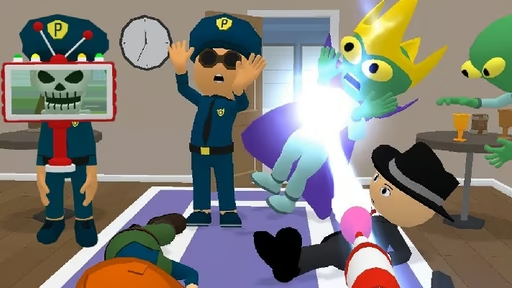
At its core, Magic Finger 3D is about creativity. The game gives you a simple power—grab, lift, drag, throw—and then asks, “How clever can you be?” Aliens might rush you, but you don’t have to match force with force. You can slam one enemy into another, toss them off ledges, stack objects like a chaotic architect, or trigger chain reactions with explosive props. It’s the kind of casual physics action that feels smooth even in short sessions, yet still delivers those “one more level” moments.
Below is a complete, reader-friendly deep dive into how it plays, why it’s fun, how to get better fast, what people usually want to know, and how to decide if it’s your kind of game. Let’s jump in. 🚀
What Magic Finger 3D Feels Like to Play 🎮
Magic Finger 3D sits in that sweet spot between a quick mobile-style arcade experience and a physics sandbox puzzle. The controls are intentionally simple: you aim with your finger, use your magical grip to pick up enemies or objects, and then release them with a satisfying snap. The joy comes from what happens next—because physics takes over.
Enemies don’t just “fall down.” They tumble, bounce, collide, and slide in ways that make every small decision matter. Throwing an alien into a barrel feels different than throwing them off a platform. Smacking two enemies together might knock both out—or it might send one flying while the other clings to the edge and stumbles back in. These micro-surprises are the magic sauce that makes a ragdoll physics game feel alive.
Even better, the game constantly nudges you to experiment. One level might place enemies near explosive barrels; another might scatter objects you can weaponize. You’ll often have multiple solutions, and the most satisfying wins usually come from being a little mischievous. 😈✨
Core Gameplay Loop: How Each Level Works 🧠➡️💥
Most levels in Magic Finger 3D follow an easy-to-understand structure:
-
You enter a compact arena (often platforms, ledges, and open space).
-
Aliens appear as your targets—sometimes grouped, sometimes spaced out.
-
You use your magic finger to manipulate enemies and objects.
-
You clear the threat by knocking enemies out, launching them off the map, or triggering environmental hazards.
-
You move to the next stage and do it again with a new twist.
That loop sounds simple, but the fun comes from the “physics puzzle” hidden inside each fight. The best approach isn’t always to grab the nearest enemy and yeet them immediately. Sometimes you want to reposition a barrel, build momentum, or use one enemy as a projectile to take out another. 🏗️🎯
If you enjoy casual action games that reward cleverness more than twitch speed, this is a great fit.
Why the Physics Combat Is So Addictive 🧲
Physics-based combat turns every encounter into a tiny story.
-
Direct hits feel powerful: grabbing an enemy and smashing them into another has that cartoonish thunk energy.
-
Environmental wins feel smart: knocking foes off platforms is faster and safer than wrestling them head-on.
-
Chain reactions feel spectacular: barrels and objects can cause multi-enemy chaos with one well-timed move.
In many action games, the “best” strategy is always the same. In Magic Finger 3D, the best strategy is often the one that uses the arena itself as your weapon. That’s why people who like fun physics games, ragdoll throw games, and casual destruction gameplay tend to stick with it.
How to Win More Easily: Practical Tips & Tricks 🔥
Here are the kinds of habits that quickly level up your results—without turning the game into homework.
1) Aim for the edges (gravity is your strongest ally) 🌌
If the level has platforms, ledges, or open drops, prioritize ring-outs. Throwing enemies off-stage usually ends the fight faster than repeated impacts.
2) Use enemies as bowling balls 🎳
When enemies spawn close together, don’t waste time picking them off one by one. Grab one and swing them into the cluster. Even if you don’t eliminate everyone, you’ll often knock multiple foes into bad positions.
3) Barrels are not “optional”—they’re shortcuts 🛢️💥
Explosive barrels are often placed where they can create big value. Instead of throwing enemies away from hazards, try tossing them into hazards.
4) Control the space before you go for style 🧊
If enemies are about to overwhelm you, play safe:
-
push back the closest threat,
-
reposition a heavy object,
-
then start setting up bigger combos.
The game rewards creativity, but survival comes first.
5) Small throws can be smarter than huge throws 🎯
Sometimes a gentle toss into a wall, a barrel, or another enemy is better than launching someone into empty space where they land safely and come back.
6) Look for “double value” moves ♟️
A great move does two things at once:
-
removes an enemy and
-
improves your position (clears space, triggers a hazard, or sets up the next throw).
That mindset makes you feel like a magician instead of just a thrower. ✨
Playstyles: Choose Your “Magic Finger” Personality 😄
Different players naturally gravitate toward different approaches, and Magic Finger 3D supports all of them:
-
The Minimalist: quick ring-outs, no mess, just efficiency.
-
The Chaos Artist: barrels, chain reactions, maximum ragdoll drama.
-
The Strategist: reposition objects, control zones, clean setups.
-
The Combo Chaser: enemy-on-enemy collisions, multi-takedowns, style wins.
If you ever feel stuck, switching your playstyle for a few levels often unlocks progress.
What Makes Magic Finger 3D Great for Quick Sessions ⏱️📱
This game is built for “I have five minutes” energy:
-
levels are short,
-
controls are intuitive,
-
results are instantly satisfying,
-
and the physics creates fresh moments even when the concept stays familiar.
That’s why it works so well as a casual time-killer game or a light “brain break” between tasks. It’s not demanding in the way hardcore shooters can be, but it’s still engaging because you’re always making little decisions.
Common Mistakes (And How to Fix Them) 🛠️
Mistake: Always throwing enemies as far as possible
Fix: throw with purpose. Aim at hazards, other enemies, or edges.
Mistake: Ignoring objects in the arena
Fix: objects are tools. Even simple props can block paths, create collisions, or set up barrel explosions.
Mistake: Trying to be stylish too early
Fix: secure space first. Once you’re safe, then go for the cinematic finish. 🎬
Mistake: Treating it like a pure reflex game
Fix: slow down half a second and scan the layout. This is often closer to a physics puzzle action game than a reaction test.
FAQ: What Players Usually Want to Know ❓✨
Is Magic Finger 3D a puzzle game or an action game?
It’s an action game with strong puzzle-like moments. You’re fighting enemies, but the “how” depends on physics, positioning, and environmental tricks.
Do I need fast reflexes to enjoy it?
Not really. Good aim helps, but clever choices usually matter more than speed.
What’s the best way to deal with groups of enemies?
Use one enemy as a projectile, or trigger environmental hazards like explosive barrels. Multi-target solutions are usually the easiest path.
Is it repetitive?
The basic mechanic stays consistent (magic grab and throw), but level layouts and object placement keep the moment-to-moment gameplay feeling different—especially if you experiment.
What kind of games is it similar to?
If you like ragdoll physics combat, casual destruction games, and simple-to-control arena levels where you “play with” the environment, you’ll probably click with it quickly.
Can I play it casually without grinding?
Yes—its strength is quick, satisfying levels. You can enjoy it in short bursts without needing long sessions.
Who Will Love Magic Finger 3D (And Who Might Not) 🤔
You’ll probably love it if you enjoy:
-
physics-based combat that feels playful
-
quick levels with satisfying outcomes
-
using the environment as a weapon
-
goofy ragdoll moments and chaotic wins 😆
You might not vibe with it if you want:
-
deep story or complex progression
-
long, strategic missions
-
tightly competitive gameplay
Magic Finger 3D shines as a “fun first” experience—easy to pick up, surprisingly clever when you want it to be, and consistently satisfying when you land that perfect toss. 👆💫
Final Thoughts: A Little Bit of Magic Goes a Long Way ✨
Magic Finger 3D proves that you don’t need complicated controls to feel powerful. With one simple ability—your magical touch—it turns every level into a mini playground where creativity beats brute force. Whether you’re launching aliens off platforms, detonating barrels for dramatic knockbacks, or turning enemies into projectiles, the game keeps delivering that light, mischievous satisfaction that makes casual physics games so replayable.
If you’re hunting for a fun ragdoll throw game, a quick physics-based action game, or just something that lets you blow off steam with silly, satisfying wins, Magic Finger 3D is an easy recommendation. Now go flick some aliens into orbit. 🚀😄







Comments